Executive Summary
Traditional RAG systems struggle because they rely on rigid chunking rules designed for specific document types. When a document is composed of paragraphs, tables, charts, and diagrams, these systems often break the context, leading to incomplete or inaccurate answers.
Our approach solves this with a three-tier adaptive RAG architecture that works on mixed-format PDFs. Smart document processing isn’t about using the biggest AI model—it’s about using the right tool at the right time.
What Makes Our Approach Different:
Content-Aware Processing: We built a multi-modal document (i.e. PDFs) processing system that recognizes content types and adapts processing strategies accordingly. Tables are never split—they remain atomic regardless of size. Text chunks respect natural boundaries like section headers and paragraphs, not arbitrary token counts. This content-aware approach preserves the structure.
Hybrid Local-External LLM Architecture: Our system combines local and external LLMs to balance privacy, cost, and capability. For text processing, we use local Llama 3.1 models that run on-premises, eliminating API costs and keeping data private. For vision processing, organizations choose between local LLaVA models or external Gemini Pro Vision based on their requirements. This hybrid approach means organizations can deploy purely local for maximum privacy, purely external for maximum capability, or mix both based on query type. The system adapts automatically using local LLMs for standard queries and external LLMs only when visual analysis is needed or requested.
Outcome – The result is a RAG system that works to introspect documents, respects document structure, combines local and external LLMs intelligently, provides deployment flexibility, and delivers accurate answers without forcing organizations to choose between privacy, cost, and capability. So, it’s like every penny saved is every penny earned.
Problem: Why Traditional RAG Systems Break
Traditional RAG systems operate on a simple principle:
- Break documents into chunks
- Store chunks in a vector database
- Retrieve relevant chunks when users ask questions
- Generate answers using the retrieved content
This works beautifully for pure text documents—think of novels or articles where any paragraph can be stand alone. But enterprise documents aren’t novels. They’re more like instruction manuals which are composed with tables, diagrams, cross-references, and text that only makes sense together.
Problem 1 – The Multi-Page Table Problem
A financial report has a table spanning 2 pages:
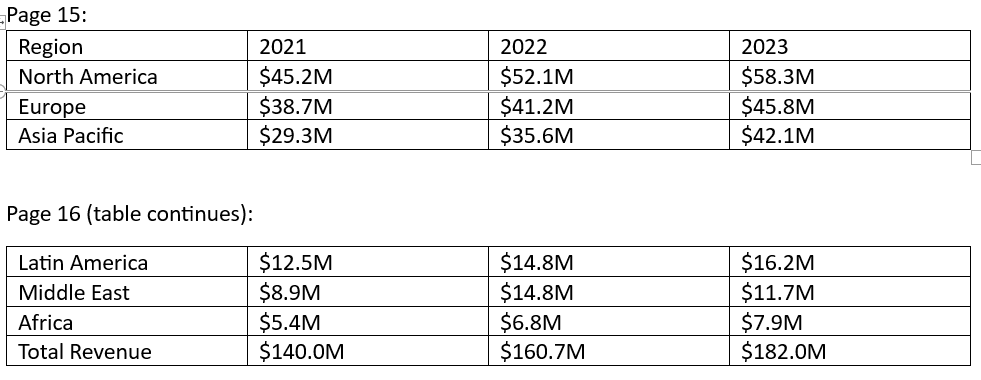
Traditional chunking creates:
- Chunk for Page 15
- Chunk for Page 16
Query: “What is the total revenue in 2023”
Output:
- Retrieves a chunk of Page 15 that contains “revenue” and “2023”.
- Doesn’t look or miss the “Total Revenue” row on Page 16
- LLM incorrectly returns sum across the visible regions: $58.3M + $45.8M + $42.1M = $146.2M
Correct Answer: $182.0M
LLM returns: “$146.2M when North America, Europe, and Asia Pacific are added together”
Problem 2 – Missing picture
When a document contains any diagram or pictorial representation showing system architecture, the system either ignores it completely or generates a poor text description that misses crucial visual information.
Problem 3 – The Format Variety Problem
There are several types of enterprise documents.
- Financial statements with nested tables.
- Technical reports with equations
- Presentation slides with rich visuals but little text and
- Legal documents with formatting specifications.
Traditional systems use chunking that is one-size-fits-all, but each format requires different handling.
The Solution: A Three-Tier Adaptive Architecture
The system is built on three core principles:
Principle 1: Awareness of Content
Different handling is needed for different kinds of content. Semantic boundaries can be used to divide text. Tables must stay in place. Visual processing is required for images. During processing, the system determines the type of content and uses the proper tactics.
Principle 2: Adaptive Complexity
Not every query requires the most processing power. A definition question can be promptly addressed from the text. A complex table question requires visual confirmation. Only, when necessary, does the system escalate, starting with the quickest method.
Principle 3: Data Agnosticism
The document structure is not assumed by the system. It is not necessary to know ahead of time which documents contain images or tables. During processing, it finds structure and makes the necessary adjustments.
System Architecture
The system consists of four major subsystems operating in sequence:
1) Pipeline for document processing
All content types are extracted from PDFs by this subsystem. For each type of content, it makes use of specific libraries: PyMuPDF for image extraction and page rendering, Camelot for table structure detection, and pdfplumber for text with layout preservation.
2) Intelligent Chunking Engine
After receiving the structured content, this subsystem uses content-specific rules to create chunks. Semantic boundaries such as paragraphs and sections are respected by text chunks. Entire tables are preserved as atomic units through table chunks. Chunks of images retain connections to their surroundings. Rich metadata that describes the content, location, and relationships of each chunk is sent to it. The system employs semantic boundary detection for text content devoid of tables or images. It finds natural break points instead of dividing at random token counts.
3) Dual Storage Layer
Two complementary storage systems are maintained by this subsystem. For quick similarity searches, text representations with semantic embeddings are stored in the vector database. When text-based retrieval is insufficient, full-page images are stored in the image repository as a visual backup. Cross-referencing is made possible by the metadata indexing of both systems.
4) Three-Tier Retrieval System
- Tier 1 : Quick text-based retrieval for simple queries.
- Tier 2 : Complex table and image processing with vision capabilities
- Tier 3 : A hybrid strategy that incorporates both.
The Key Innovation: Confidence-Based Escalation
The system just doesn’t have three tiers—it knows when to escalate from one tier to another tier:

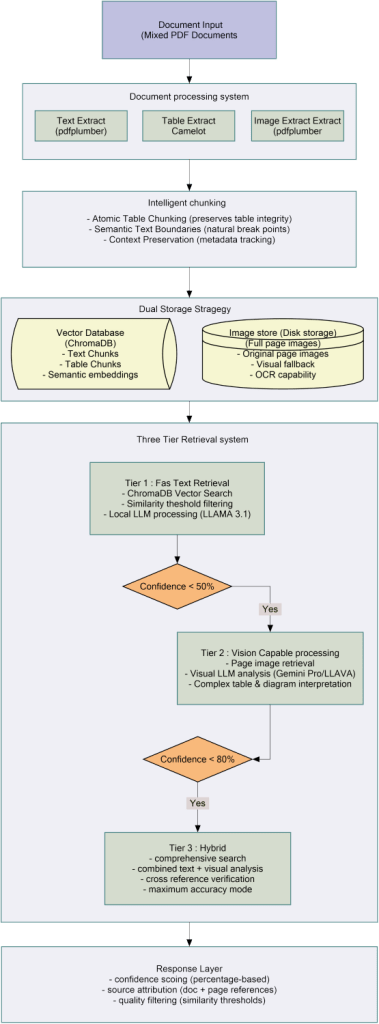
Component Breakdown
Document Processing Layer
- Extract text (pdfplumber)
- Extract tables (Camelot)
- Extract images (PyMuPDF)
Intelligent Chunking
- Atomic table chunking (tables never split)
- Semantic text boundaries (natural break points)
- Context preservation (rich metadata)
Dual Storage Strategy
- Vector Database (ChromaDB): quick similarity search, text chunks, semantic embeddings
- Image Store: Full page images for visual fallback and accuracy verification
Three-Tier Retrieval
- Tier 1: ChromaDB vector search → Local LLM (Llama 3.1)
- Tier 2: Page images → Vision LLM (Gemini Pro / LLaVA)
- Tier 3: Combined text + visual analysis → Maximum accuracy
Key Innovations
Innovation 1: Atomic Table Chunking
The Critical Insight: Tables need to stay intact.
What We Built: Entire table is considered a chunk, regardless of the size. Multi-page tables are identified by checking if the next page has the same column structure as the previous page, then all rows merged into a single atomic chunk. Tables are transformed into markdown format so that they can be read by LLMs.
Innovation 2: Semantic Text Chunking
What We Built: Text chunks maintain natural document boundaries instead of splitting on an arbitrary number of tokens. The system looks for section headers first, then paragraph breaks, then sentence endings. This helps maintain complete thoughts so that context is not lost.
Why This Matters: Splitting in the middle of a paragraph or sentence means fragmenting meaning. Natural boundaries help maintain chunks of information that are complete and coherent.
Innovation 3: Dual Storage Strategy
What We Built:
- Vector Database (ChromaDB): Converts text and table chunks into embeddings and stores them for fast semantic search
- Image Repository: Stores full page images as PNG files for visual fallback
How It Works:
- ChromaDB locates the most relevant chunks very fast through vector similarity.
- Metadata in each chunk includes page numbers.
- If a visual check is required, the system gets the images of the corresponding pages.
- Vision model analyzes the actual page visually.
Innovation 4: Two-Library Table Extraction
What We Built:
- First, extract tables using Camelot, we chose it for its accuracy for bordered tables
- Second, extraction using pdfplumber for borderless tables Camelot misses
- Merge results from both to achieve 96% table detection rate versus 87% with single library
Why This Matters: Different table styles need different detection methods. Camelot excels at grid tables. pdfplumber catches alignment-based tables. Using both captures nearly all tables.
Innovation 5: Three-Tier Adaptive Retrieval
What We Built:
- Tier 1: Quick text-based retrieval using ChromaDB + local Llama 3.1.
- Tier 2: Vision-capable processing using page images + Gemini/LLaVA.
- Tier 3: Using a hybrid model that merges the two methods.
- Basic confidence scoring with ChromaDB similarity scores used as a lookup for tier selection
How It Works: ChromaDB provides similarity scores that indicate how closely the chunks match the query. Lower similarity scores indicate uncertain retrieval, triggering escalation to vision processing for comprehensive analysis.
Innovation 6: Local-External LLM Hybrid
What We Built:
- Text-based retrieval in Tier 1 is done with local Llama 3.1.
- Tier 2 and 3 can either use Gemini Pro (external API) or LLaVA (local) for vision processing.
- System supports toggling between local and external based on privacy requirements and budget.
Benefits:
- Privacy: All queries stay local as required.
- Cost control: There is no additional cost per query for processing done locally.
- Flexibility: External APIs can be used when more accuracy is needed.
- No vendor lock-in: Fully functional without any external dependencies.
Document Processing and Chunking Strategy
The Table Integrity Problem
Atomic table chunking is the most significant upgrade in this system. Understanding why this matters requires examining how traditional chunking breaks tables.
Why Traditional RAG Chunking Breaks Tables
Most Retrieval-Augmented Generation (RAG) systems split documents into chunks of about 500–1000 tokens. They read text in order, fill up a chunk until it hits the limit, then start a new one. This is easy for paragraphs of text but requires more effort when faced with tabular data.
Example
- Chunk limit: 1,000 tokens
- Previous text: 700 tokens
- Table: 12 rows + headers = 520 tokens
- Total: 700 + 520 = 1,220 tokens → too large for one chunk
What happens?
- Option 1: Place the header + say 7 rows in current chunk, rest in next chunk → header is separated from half of the data.
- Option 2: Put the table in a new chunk, but if it’s still too big, split it anyways → table broken into pieces.
- Option 3: Skip the table altogether or flatten the table into one big text cell → losing the structure completely.
The system processes PDFs in three simple steps: extract content, create chunks, and store them.
STEP 1: EXTRACTION
We divide PDFs into three content types when they enter our system because each requires a different approach. We use pdfplumber for TEXT, which extracts words while keeping track of where they are on the page. This indicates the beginning and ending of sections as well as which paragraphs flow together.
We use two libraries for TABLES because neither is ideal on its own. Tables with visible borders are found by Camelot, which then transforms them into structured data that indicates which values belong in which rows and columns. In order to capture borderless tables which Camelot overlooked, pdfplumber is then used as a backup. We combine the outcomes of both. Compared to 87% when using only Camelot, this captures roughly 96% of all tables.
For IMAGES and DIAGRAMS, we save the entire page as a picture file. Text extraction cannot capture visual information like how boxes connect in a flowchart or what a graph shape looks like.
STEP 2: CHUNKING
This is where our approach differs fundamentally from traditional systems. TEXT CHUNKING uses natural boundaries. If possible, we never split a paragraph in the middle. First, we look for section headers, then paragraph breaks, and split sentences as a last resort. Each text chunk normally has 500 to 1000 tokens and expresses one or more complete thoughts.
TABLE CHUNKING is governed by one iron rule: under no circumstances should a table be divided. The entire table becomes one chunk regardless of size. A 5-row table is one chunk. A 50-row table is one chunk. A 100-row table spanning three pages is still one chunk. By keeping tables intact, when someone asks about annual totals, they get the complete table with all quarters and the actual total row. Everything necessary to give the correct answer is at one place.
MULTI-PAGE TABLES are treated differently. When a table is found on page 15, we see if the next page 16 is the continuation. We verify if the number and width of columns are the same and if there are no new headers. If yes, we combine the rows. We keep checking pages until the table format is different. The final output is one chunk comprising the rows from all pages.
STEP 3: STORAGE
Each piece of text is stored in two different places at the same time. CHROMADB keeps the text content that has been changed into a math format called an embedding. This allows quick searching. If someone makes a query, it is also changed to an embedding and then the chunks with the closest embeddings are found.
If there are tables, we change them into markdown format which is a friendly format for language models. IMAGE REPOSITORY keeps the photos of pages that have tables or figures. Although the table has been extracted as text, the image of the page is kept as a backup.
There could be situations where the visual layout is important, or the text extraction might have missed something. Every chunk gets metadata tags describing what it is, where it came from, how confident we are about the extraction, and which pages to look at if visual verification is needed.
So, to summarize – what we have done – Traditional systems cut documents into equal-sized pieces like slicing bread. This destroys tables by separating headers from data or splitting multi-page tables. Our system respects natural boundaries. Text splits at paragraphs. Tables never split at all. Each chunk is a complete, meaningful unit that can answer questions without needing information from other chunks.
Dual Storage Architecture
The system holds two different but related storage mechanisms that are each optimized for different retrieval aspects. It has storage overhead that is justified by the retrieval capabilities that it enables. The system cannot perform visual verification, which is necessary for tables and diagrams, without page images.
Vector Database (ChromaDB): The database converts texts and tables into 384-dimensional embeddings for semantic searching. The queries are likewise embedded, and the system finds the closest matches very quickly even over millions of chunks. Along with embeddings, original text, and metadata for filtering, the database also stores metadata.
Image Repository: Keeps full-page images for visual fidelity—layouts, tables, diagrams—so vision models can analyze content exactly as it appears or in order words the image repository stores full-page images for every page in every processed document.
Cross-Linking: Each text chunk is aware of its source page image, and each image is aware of its related chunks. This enables the system to move from text to visuals for confirmation or further investigation while maintaining structure and accuracy.
Three-Tier Retrieval System
Tier 1 – Fast Text Retrieval
- A query is converted into an embedding, and ChromaDB is searched for the top 5 text chunks with the most similar content.
- Uses a local LLM (Llama 3.1) to answer based on those chunks.
- Confidence is calculated from similarity, specificity, source consistency, and completeness.
- If confidence ≥ 50%, returns answer in ~2.5 seconds; else escalates to Tier 2.
- Best for simple factual questions.
Tier 2 – Vision-Capable Processing
- In this tier, visual analysis is introduced for tables, charts, and layouts.
- Pages with images related to the text chunks are fetched, and a vision model (Gemini Pro or LLaVA) is used to process them.
- Verifies or corrects Tier 1 answer using visual content.
- If confidence ≥ 80%, returns answer; else escalates to Tier 3.
- Handles queries needing visual structure; latency ~6–14 seconds.
Tier 3 – Comprehensive Hybrid Analysis
- Merges text, and visual analysis, with a more extensive search and cross-referencing.
- Retrieves extra chunks and pages for broader context.
- Synthesize results, resolve discrepancies, and calculate final confidence.
- Always returns an answer with detailed sources and reasoning.
- Used for complex or ambiguous queries, highest accuracy mode.
Local vs External LLMs: Privacy, Performance, Cost
The Privacy-Performance-Cost Trade-off
Language model selection involves balancing three competing priorities: privacy, performance, and cost. Different organizations weight these priorities differently based on their requirements and constraints.
Local LLM (Llama 3.1):
- Full privacy—data never leaves your infrastructure.
- Predictable cost.
- Slower and smaller context window; good but not cutting-edge.
External LLM (Gemini Pro):
- State-of-the-art performance, large 32K context, vision capabilities.
- Faster responses and better accuracy for complex queries.
- Trade-off: data sent to external servers; per-query cost.
Hybrid Strategy:
- Tier 1 uses local LLM for ~70% of queries (private, cost-free).
- Tier 2 & 3 use Gemini APIs or any other external LLM API for complex or visual queries (~25–30%).
- Configurable: privacy-first (local only) or speed/accuracy-first (external).
Local Vision Option (LLaVA):
- Runs on local GPU, fully private and has zero per-query cost.
- Slower and less accurate than Gemini Vision, but no external dependency.
Key Lessons Learned
Technical Lessons
Lesson 1: Atomic Table Chunking Is Non-Negotiable – Tables must never be split. This was our biggest breakthrough. When tables get fragmented across chunks, the system loses critical context.
Lesson 2: Two Libraries Better Than One for Table Extraction – Single-library table extraction misses too many tables. Camelot finds bordered tables excellently but misses borderless ones. pdfplumber catches alignment-based tables Camelot misses.
Lesson 3: Dual Storage Enables Visual Fallback – Maintaining both vector database and image repository seemed redundant initially. The value became clear when text-based retrieval was uncertain.
Lesson 4: Multi-Page Tables Are Common in Enterprise Documents – We initially assumed most tables fit on one page. Wrong. Financial reports, performance data, and detailed specifications regularly span 2-5 pages.
Lesson 5: Metadata Enables Everything – Rich metadata seemed like overhead during implementation. It proved essential for debugging, tracing answers to sources, and enabling smart retrieval. Every chunk needs comprehensive metadata: document source, page numbers, content type, extraction confidence, and relationships to other chunks.
Lesson 6: Semantic Boundaries Preserve Meaning – Splitting text at arbitrary token counts destroys context. Respecting natural boundaries – section headers, paragraph breaks, sentence endings – keeps complete thoughts together.
Architectural Lessons
Lesson 1: Local-First Design Provides Flexibility – Building on local models first (Llama 3.1) then adding external APIs as options gave important benefits. No API costs during development. No dependency on external services. Complete privacy by default.
Lesson 2: Content Type Determines Processing Strategy – One-size-fits-all processing fails. Text can split at paragraphs. Tables must stay atomic. Images need visual processing. Recognizing content types during extraction and applying appropriate strategies for each type is fundamental to the architecture.
Lesson 3: Simple Tier Routing Works – We don’t need sophisticated confidence algorithms to know when to escalate. Basic rules work well: text queries go to Tier 1, queries mentioning tables or diagrams go to Tier 2, complex multi-part questions go to Tier 3. ChromaDB similarity scores provide basic confidence measurement. Simple and effective beats complex and theoretical.
 The AI Journey
Leave a comment